
A clean App Router, Supabase, Drizzle, and Stripe foundation you own
The old SaaS playbook is broken. Bolting features onto a fragile architecture with vendor-locked identity and messy billing logic is a recipe for technical debt. It's time to stop patching and start building on a solid foundation.
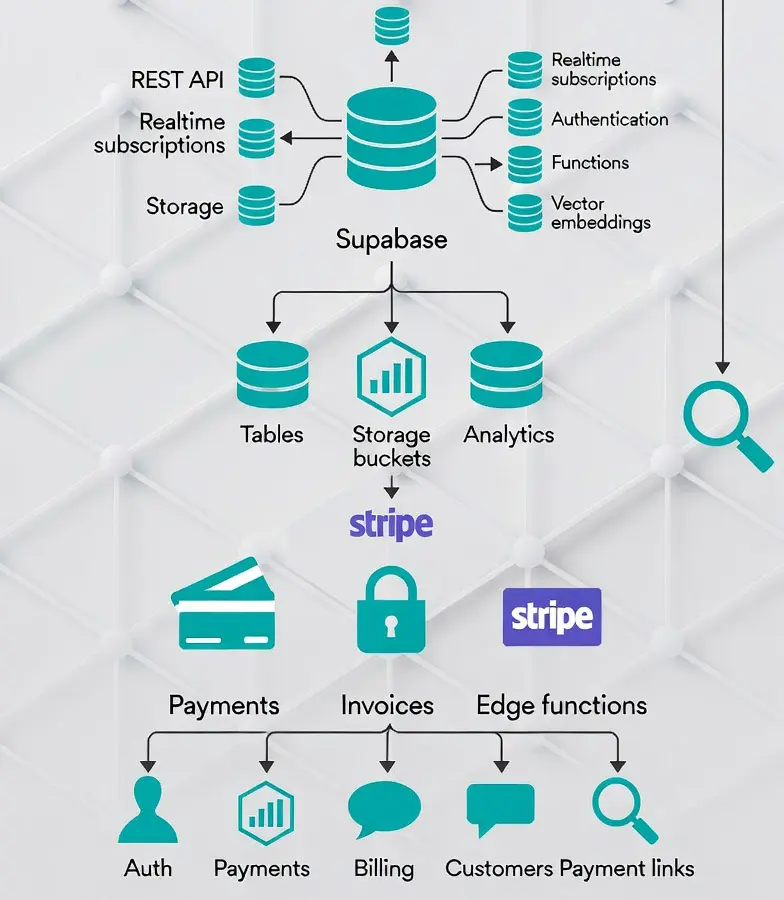
This guide provides that foundation. A clean, modular stack for builders who value ownership, control, and execution. We'll integrate Better Auth for identity, Supabase for a managed Postgres database, Drizzle for a lightweight ORM, and Stripe for automated billing—all unified by the power of the Next.js App Router.
This isn't an incremental improvement. It's a transformational shift in how you build.
The Foundation: A Modern Architecture
Clean separation of concerns isn't a "nice-to-have." It's everything. This stack is designed for clarity and durability.
- Next.js App Router: The core for routes, middleware, and server components. It follows the standard Next.js App Router layout: routes, middleware, and Server Components where they fit.
- Better Auth + Drizzle on Supabase: The single source of truth for identity. We own our user data on a managed Postgres instance, accessed via a type-safe, lightweight adapter. No provider-specific JWTs, no lock-in.
- Stripe: The automated billing engine. We offload PCI scope, SCA/3DS, and subscription management to Stripe’s hosted Checkout and billing portal, integrated cleanly via webhooks.
The pieces are wired so one person can run auth, billing, and deploys.
Prerequisites
You're a builder. You probably have this ready.
- Node.js LTS
- A Next.js 14/15 project
- A Supabase project with Postgres
- A Stripe account (test mode is fine)
- Stripe CLI for local webhook testing
1. Laying the Groundwork
First, we assemble the core components.
Install Dependencies
Pull in the necessary SDKs and adapters. One command.
npm install better-auth pg drizzle-orm drizzle-kit stripe @stripe/stripe-jsConfigure Your Environment
Create a .env.local file. These keys are non-negotiable. Keep them secure.
# Better Auth: Secret for signing sessions
BETTER_AUTH_SECRET="your_long_random_secret"
BETTER_AUTH_URL="http://localhost:3000"

# Database: Supabase Postgres connection string
DATABASE_URL="postgresql://USER:PASSWORD@HOST:PORT/postgres?sslmode=require"

# Stripe: API keys and webhook secret for signature verification
STRIPE_SECRET_KEY="sk_test_xxx"
NEXT_PUBLIC_STRIPE_PUBLISHABLE_KEY="pk_test_xxx"
STRIPE_WEBHOOK_SECRET="whsec_xxx" # From Stripe CLI or dashboard
2. The Database: Your Single Source of Truth
We build on Supabase Postgres for its reliability and scalability. Drizzle gives us a type-safe, high-performance way to talk to it.
Create the Drizzle Client
Create a pooled connection to Supabase. This is your gateway to the database.
// lib/db.ts
import { Pool } from "pg";
import { drizzle } from "drizzle-orm/node-postgres";
import * as schema from "@/drizzle/schema";

export const pool = new Pool({
  connectionString: process.env.DATABASE_URL,
  ssl: { rejectUnauthorized: false }, // Adjust for production CAs
  max: 10,
});

export const db = drizzle(pool, { schema });
Generate and Run Migrations
Use Drizzle Kit or the Better Auth CLI to generate the SQL for the auth tables. Apply it via the Supabase SQL Editor. Your foundation needs a schema.
3. Identity: The Ownership Layer
Better Auth gives you full control over your user model and authentication logic.
Configure Better Auth
In lib/auth.ts, we wire Better Auth to use our Drizzle client and define our authentication rules.
// lib/auth.ts
import { betterAuth } from "better-auth";
import { drizzleAdapter } from "better-auth/adapters/drizzle";
import { db } from "@/lib/db";
import Stripe from "stripe";
import { stripePlugin } from "better-auth/plugins/stripe";

// Your email sending implementation (Resend, SES, etc.)
async function sendEmail({ to, subject, html }: { to: string; subject:string; html: string }) {
  console.log(`Sending email to ${to} with subject: ${subject}`);
}

const stripe = new Stripe(process.env.STRIPE_SECRET_KEY!, { apiVersion: "2024-06-20" });

export const auth = betterAuth({
  database: drizzleAdapter(db, { provider: "pg" }),

  emailAndPassword: {
    enabled: true,
    // Define strong password rules
  },

  email: {
    sendVerificationEmail: async ({ email, token }) => { /* ... */ },
    sendPasswordResetEmail: async ({ email, token }) => { /* ... */ },
    requireVerification: true,
  },

  session: {
    strategy: "database",
    maxAge: 14 * 24 * 60 * 60 * 1000, // 14 days
  },

  plugins: [
    stripePlugin({
      stripeClient: stripe,
      stripeWebhookSecret: process.env.STRIPE_WEBHOOK_SECRET!,
      createCustomerOnSignUp: true,
      subscriptions: {
        enabled: true,
        plans: [
          { name: "basic", priceId: "price_xxx_basic" },
          { name: "pro",   priceId: "price_xxx_pro" },
        ],
        requireEmailVerification: true,
      },
    }),
  ],
});```

# 4. The Framework: Tying It All Together
With the core configured, we wire it into the Next.js App Router with a catch-all route.

### Expose the Auth API Handler
A single catch-all route handles all authentication endpoints (`/signin`, `/signout`, `/verify-email`, etc.). Clean.
```typescript
// app/api/auth/[...all]/route.ts
import { auth } from "@/lib/auth";
import { toNextJsHandler } from "better-auth/next-js";

export const { GET, POST } = toNextJsHandler(auth.handler);
Protect routes with middleware
Guard your protected routes. Unauthenticated users are redirected to sign-in. This is fundamental.
// middleware.ts
import { NextRequest, NextResponse } from "next/server";
import { auth } from "@/lib/auth";

export async function middleware(req: NextRequest) {
  const publicPaths = ["/signin", "/signup"]; // Add other public paths
  const path = req.nextUrl.pathname;
  if (publicPaths.includes(path) || path.startsWith("/api/")) {
    return NextResponse.next();
  }

  const session = await auth.api.getSession({ headers: req.headers });
  if (!session) {
    const signinUrl = new URL("/signin", req.url);
    signinUrl.searchParams.set("callbackUrl", path);
    return NextResponse.redirect(signinUrl);
  }
  return NextResponse.next();
}

export const config = { matcher: ["/((?!_next/static|_next/image|favicon.ico).*)"] };
Use Sessions in Server Components
Fetch session data directly on the server. No client-side roundtrips needed.
// app/dashboard/page.tsx
import { auth } from "@/lib/auth";
import { headers } from "next/headers";
import { redirect } from "next/navigation";

export default async function DashboardPage() {
  const session = await auth.api.getSession({ headers: headers() });
  if (!session) redirect("/signin");

  // Your protected page logic here
  return <h1>Welcome, {session.user.email}</h1>;
}
4. The Engine: Automated Billing with Stripe
The Stripe plugin handles the complexity of creating customers, managing checkout, and listening for webhook events. You focus on your product.
Trigger a Subscription
From your pricing page, a client-side action creates a Checkout Session and redirects the user to Stripe.
// Your client-side action
import { createAuthClient } from "better-auth/react";
const authClient = createAuthClient();

export async function startSubscription(plan: "basic" | "pro") {
  const { error } = await authClient.subscription.upgrade({
    plan,
    successUrl: `${window.location.origin}/dashboard`,
    cancelUrl: `${window.location.origin}/pricing`,
  });
  if (error) {
    // Handle error gracefully
    alert(error.message);
  }
}
Handle with Webhooks
Point your Stripe webhook to /api/auth/stripe. The plugin handles signature verification and updates your database automatically when a subscription is created or changed. Use the Stripe CLI for local testing:
stripe listen --forward-to localhost:3000/api/auth/stripeManage Billing
Redirect users to the Stripe Billing Portal to manage their subscriptions, payment methods, and invoices. The plugin provides a simple action to create a portal session.
Security: Non-Negotiable Defaults
- CSRF Protection: Handled out of the box by Better Auth for all auth-related POST requests.
- Webhook Verification: The Stripe plugin validates webhook signatures. Rejects any request that doesn't match.
- Secret Management: Keep BETTER_AUTH_SECRET and STRIPE_SECRET_KEY server-side. Never expose them to the client.
Wrap Up
This is a working starting point: App Router, Supabase, Drizzle, Stripe, with auth and billing wired. Stop wrestling with legacy auth providers and messy billing code. Build on a solid foundation. Expand. Then execute.